
Forwarding PDFs to a Trustworthy Account with Email-to-Trustworthy
Trustworthy provides a unique email address that allows you to forward important PDF attachments directly into your vault. This feature is a convenient way to add files from your email inbox without downloading them first to your computer. You can find this feature by clicking the Add button or within your account Settings.
Locating and Managing Your Trustworthy Email Address
You can access your unique email address in two ways:
Click the Add button in the left panel on your dashboard, and select Direct email,
Navigate to your Settings and click the Email to Trustworthy tab. Once you open the Email to Trustworthy window, you will see your unique email address and several management options.
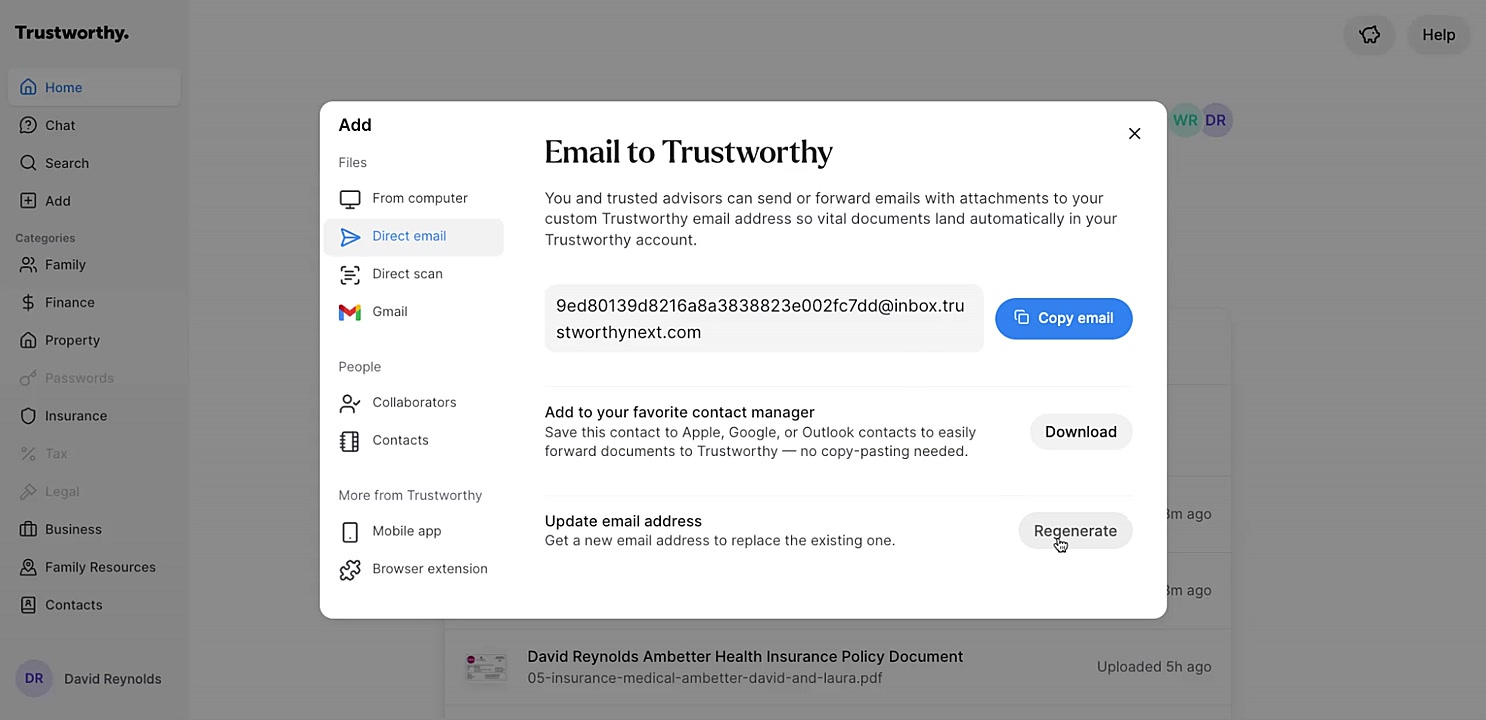
From here, you have choices as to how to use your unique email address:
Copy email: Click this button to copy the email address to your clipboard for easy pasting.
Download: Saves this email address as a contact card that you can easily import into your preferred contact manager like Apple, Google, or Outlook.
Regenerate: Click this to create a new, unique email address. This action will replace and deactivate the existing one. Save your unique email address as a contact in your address book (e.g., "Trustworthy Account") to make forwarding attachments quick and easy. If you regenerate your email address, remember to update it in your contacts, as the old one will no longer work.
Where Your Files Will Appear
When documents arrive through Email to Trustworthy, you will find them in your Trustworthy Inbox.
Forwarded files usually appear within a few minutes, though heavier email traffic can occasionally make it take a little longer.
From the Inbox, you can review suggested details and filing locations before accepting the file into your account.
After your email is processed, you should also automatically receive a confirmation email from Trustworthy letting you know whether the upload succeeded or failed.
If there was an issue, the error email will often include the subject line of the original email, which can be helpful when troubleshooting. In either case, we recommend reviewing the tips below if your file does not appear as expected.
Tips for Using This Feature
These simple checks solve most issues quickly:
Only PDF email attachments are ingested by Trustworthy. The email body itself is not imported. This means if your receipt, for example, is embedded in the email body, it will not be added to Trustworthy.
Download the receipt and add it to Trustworthy or use the Trustworthy Browser Extension to take a screenshot and it will appear in your account automatically.
Google Drive or Dropbox “sharing links” are not supported. The file must be attached directly to the email.
If you send many emails in a row and one fails, the error notification will reference the email subject line, which can help identify the issue.
Duplicate files cannot be added again.
If a file does not arrive as expected, check the following:
Was the file attached directly to the email?
Was it embedded in the email body instead of attached?
Was it a supported file type?
Was the file already uploaded previously?
Did the email include a recognizable subject line? This can help when reviewing these troubleshooting tips or when contacting Support@Trustworthy.com for assistance.