
Deleting Your Account
Whether you have a paid account or free account, you can delete your Trustworthy account from your Account menu when you are signed in on the web.
This process can take up to 72hrs to complete and will delete all data and files stored in Trustworthy. Unless you belong to another household, your sign-in credentials will be deleted, too.
If you only wish to cancel your subscription, but keep your data intact in Trustworthy, go to Settings > Manage Plan > Click Manage > Click Cancel Plan. This is helpful for situations where you need to cancel with the intention to restart at a future date, or to switch to a different plan, but you want to keep your data.
If you subscribed in the Trustworthy app on a phone or tablet, your subscription is billed by Apple or Google and is canceled in your App Store or Google Play account instead—see Managing Your Subscription for the steps.
Deleting your account does not automatically issue a refund. If you delete an account with an active subscription, you won't receive a refund unless you reach out to Trustworthy and are within the 30-day money-back window on a first-time subscription. To request a refund, email support@trustworthy.com before deleting your account.
Deleting your account does not cancel an App Store or Google Play subscription. If you subscribed in the Trustworthy app on a phone or tablet, cancel it with Apple or Google as well—deleting your account on its own will not stop the charges.
Deleting your account on the web
⚠️ Before deleting your account, we recommend exporting your files.
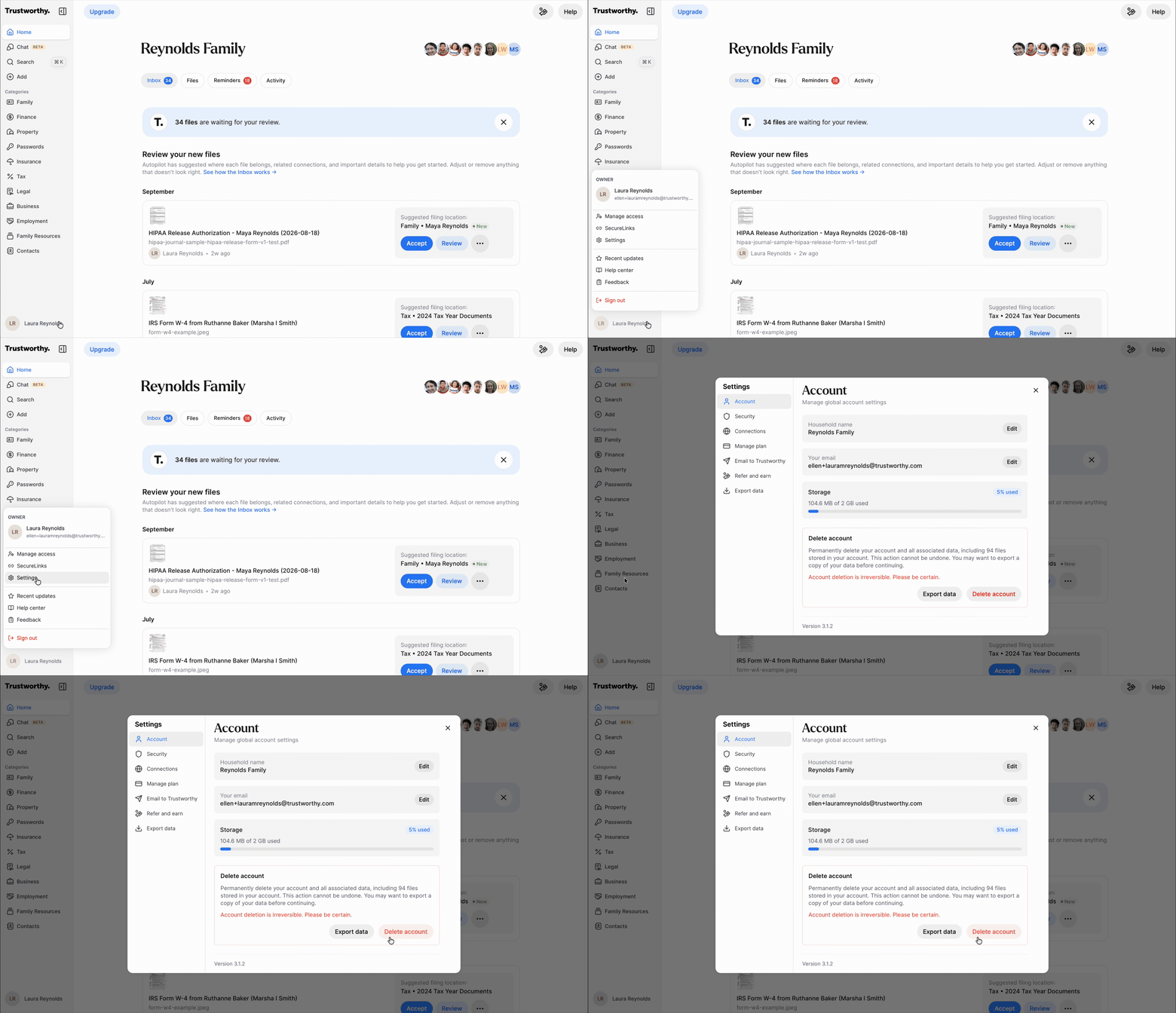
Go to Account Menu > Settings > Delete account.
Deleting your account from mobile
You delete your account on the web, not in the Trustworthy app on your phone or tablet. If you tap Account menu > Settings > Account > Delete account in the app, you will be asked to sign in on the web to finish.
If you have more than one household
The button is called Delete account, but it deletes the household you are currently in. Your other households are not deleted.
Switch to the household you want to delete before you start. Then check the Household name at the top of Settings > Account to confirm you are in the right one.
You can only delete a household you own. To leave a household someone else owns, ask its owner to remove you.
If you still belong to another household, your sign-in credentials are not deleted. You will be signed out shortly after you confirm — sign back in with the same email and password, or the social login you use, and you will still have access to your other households. We will also email you a confirmation naming the households you still have access to.