
Managing Your Subscription
To review and manage your Trustworthy Subscription, navigate to your Account Menu in the lower-left hand corner on desktop.
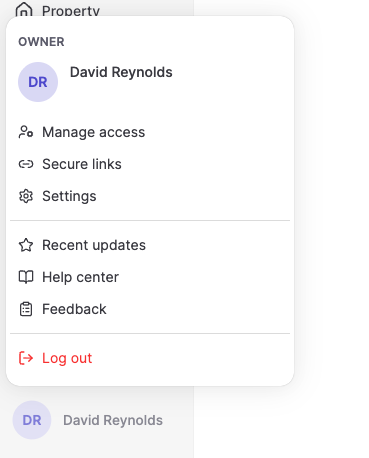
From Settings, choose Manage plan.
There you will see the name of the plan you are subscribed to and an option to Manage that plan.
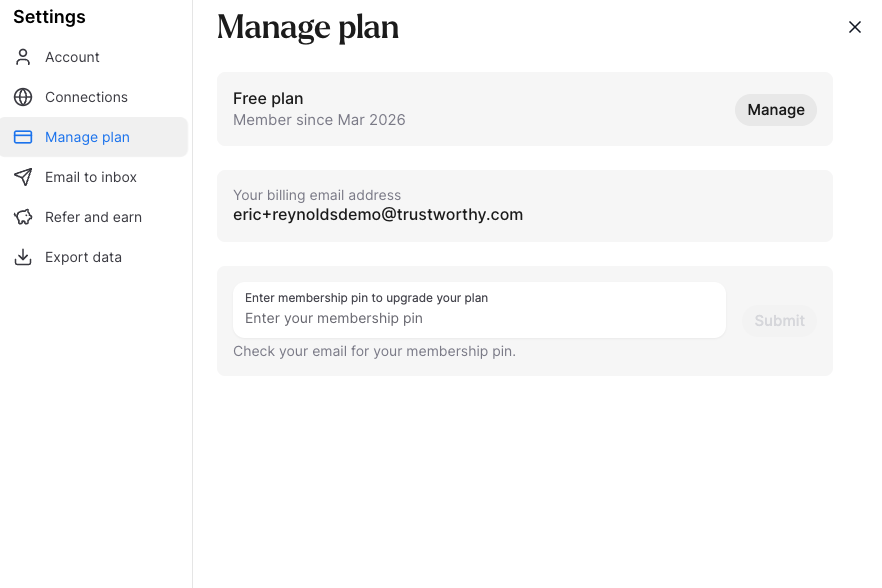
If you click on Manage, you'll be taken to a page powered by Stripe, our payment processor. On this page you can change your plan and billing information, such as your credit card.
If you upgrade or downgrade, the difference in subscription plan price will be debited or credited to your account automatically. An upgrade will result in an additional charge to your payment method on file. A downgrade will result in an automatic credit to your account that will be applied to your next renewal.
Upgrading from the mobile app
You can manage your plan from the Trustworthy app on iPhone or Android, too.
Tap your user menu in the top right corner.
Choose Settings, then Manage plan.
You'll see the plan you're currently on—for example, Free.
Tap Manage to see the plan options.
Tap the plan you want and complete your payment.
Your membership works everywhere you sign in—mobile, tablet, or desktop. Upgrading on your phone applies to your whole household account, not just that device.
Purchases made in the mobile app are processed by Apple or Google as in-app purchases, rather than through Stripe like purchases made on the web. Your receipt comes from Apple or Google, and refunds for those purchases are handled by them rather than by Trustworthy.
Canceling your subscription
Where you cancel depends on where you subscribed. In every case your plan stays active until the end of the period you have already paid for, and your household's information remains secure in Trustworthy.
If you subscribed on the web, go to Settings, then Manage plan, and click Manage. On the Stripe page that opens, choose Cancel plan.
If you subscribed in the app on an iPhone or iPad, Apple handles your billing, so the cancellation happens in your Apple account. Trustworthy can't cancel an App Store subscription for you.
On your iPhone or iPad:
Open Settings.
Tap your name at the top.
Tap Subscriptions.
Tap Trustworthy.
Tap Cancel Subscription.
On a Mac:
Open the App Store.
Click your name in the bottom-left corner.
Click Account Settings.
Scroll to Subscriptions, then click Manage and Edit.
Next to Trustworthy, click Cancel Subscription.
If you subscribed in the app on an Android device, Google handles your billing:
Open the Google Play Store app.
Tap your profile icon in the top-right corner.
Tap Payments & subscriptions, then Subscriptions.
Tap Trustworthy.
Tap Cancel subscription.
Deleting your Trustworthy account does not cancel an App Store or Google Play subscription. If you subscribed through Apple or Google, cancel it with them using the steps above—deleting your account on its own will not stop the charges. See Deleting Your Account.
If the account owner passes away
Anyone already on the account with full access can take over the subscription. They sign in and from their user profile menu (bottom left) open Settings, then Manage plan, and the payment method they add covers the whole household account.
Collaborators with partial access won't see Manage plan in their menu. A full-access member of the account can make the change instead.
If the subscription was originally purchased through the App Store or Google Play, it stays in the original purchaser's Apple or Google account and can't be taken over by someone else. Email support@trustworthy.com and we'll help you start the plan again on the web.
If the person taking over isn't on the account yet—someone named as a legacy access collaborator, for example—they'll go through the legacy access process first to verify their identity and gain access. Once that's done, they can manage the subscription the same way.
Refunds
Trustworthy offers a 30-day money-back guarantee on first-time subscriptions. If Trustworthy isn't the right fit, email support@trustworthy.com within 30 days of your purchase for a full refund. The guarantee applies to first-time subscriptions only, not renewals.
If you purchased your subscription through the App Store or Google Play, refunds are handled by Apple or Google rather than Trustworthy.