
Manage Your Multi-Factor Authentication (2FA)
To help protect your sensitive information, every Trustworthy account requires multi-factor authentication (also called two factor authentication or 2FA) before you can begin adding or managing information. You’ll set up your first authentication method when creating your account.
You can update your authentication settings at any time, including adding multiple 2FA methods for added flexibility and backup access.
Please note that Security settings are available on desktop only, and not the Trustworthy mobile app.
To Manage Your 2FA Methods
Sign in to your Trustworthy account.
Open your account Profile menu (bottom left corner of the screen).
Select Settings.
In Settings, choose Security.
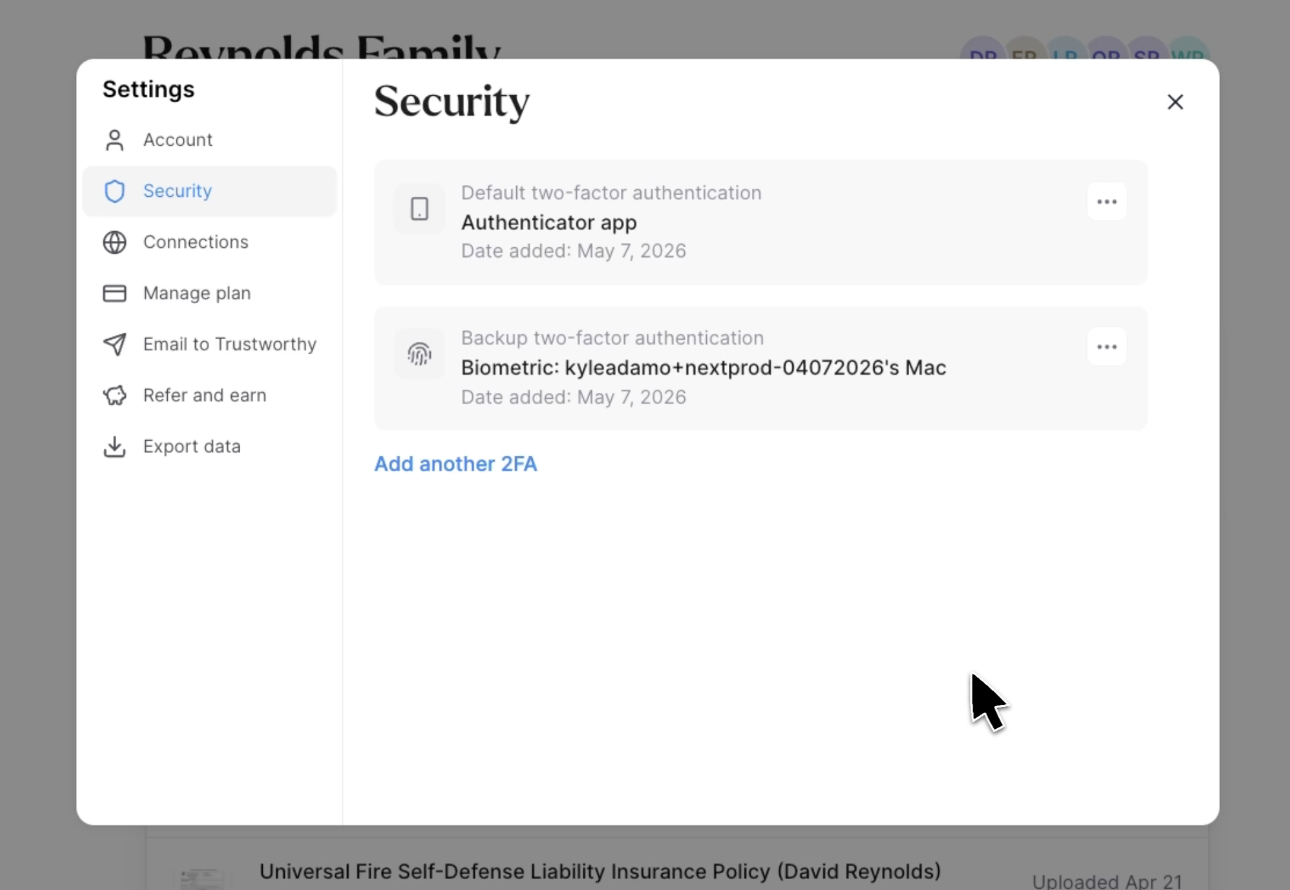
You’ll see your current authentication methods, such as:
Authenticator apps such as Google Authenticator, or the one built into your iPhone or iPad
Biometrics on supported devices
Text message (SMS) verification
Security keys (like YubiKey)
To Remove a 2FA Method
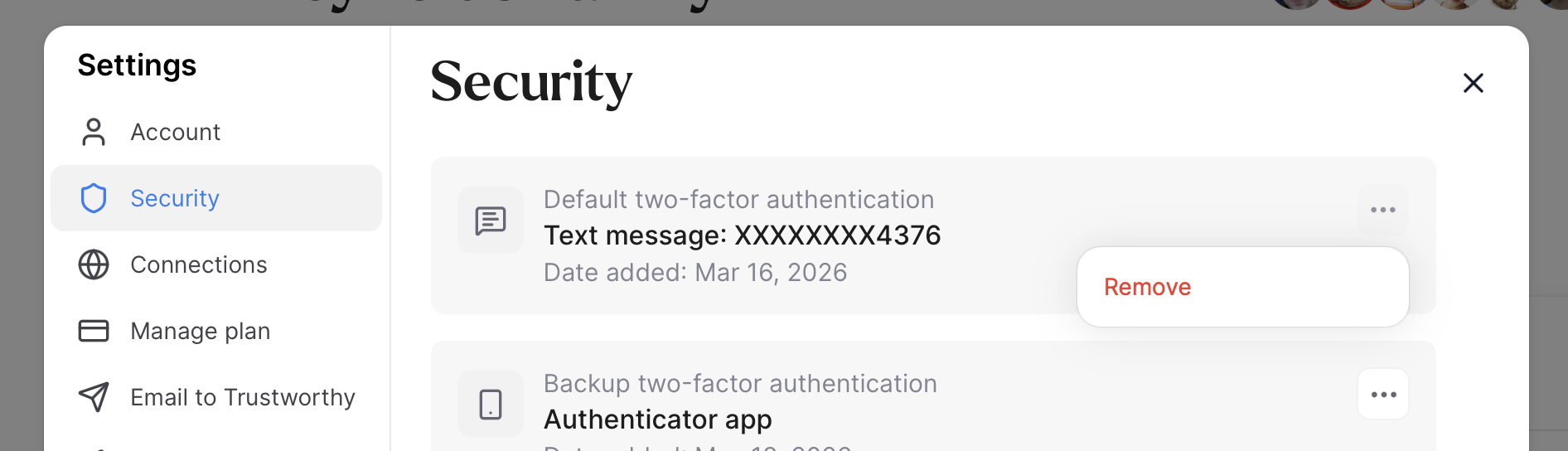
Select the three dot menu to remove the 2FA.
Complete the authentication prompt.
Back in your Security settings, you’ll now see the authentication method is removed from the list.
Removing one method leaves your other methods in place — it doesn’t reset your 2FA or sign you out on your other devices. If you only have one method on your account, Remove is grayed out; add another method first.
To Add Another 2FA Method
Select Add another 2FA.
Complete the authentication prompt.
Choose the type of authentication method you want to add by selecting Choose 2FA method.
Follow the on-screen instructions to complete setup.
Once you see Success, you can close the enrollment tab.
Back in your Security settings, you’ll now see the newly added authentication method listed.
Using Face ID or a Fingerprint (Passkeys)
A passkey lets you confirm it's you with your device's own Face ID, fingerprint, or Windows Hello, instead of waiting for a texted code or opening an authenticator app.
On a computer where you have set one up, Trustworthy may ask for your fingerprint or face instead of your password when you sign in. If you would rather type your password, select Use password on that screen. A passkey can also be asked for as your second step, after your password.
How to add one. There's no button for this in Settings. Trustworthy offers it to you on a computer, after you've completed your second step while signing in. It isn't offered while you're creating your account, so if you've just signed up, expect it when you next sign in. The prompt is headed "Log in faster with fingerprint or face recognition" and gives you three choices:
Continue — set it up now. It takes a few seconds, and afterwards you'll see it in Settings → Security listed as "Biometric" with your device name.
Remind me later — skip it for now and be offered it again.
Not on this device — don't ask again on this computer. That's remembered for a year.
Changed your mind after choosing "Not on this device"? Your choice is stored in your browser's cookies, so clearing cookies for Trustworthy brings the prompt back the next time you sign in instead of waiting out the year.
To Replace One 2FA Method With Another
If you have only one 2FA method in place, then to replace that method with another, you must first add the new method before removing the existing one. This helps ensure your Trustworthy account is always protected with at least one active 2FA method.
Before removing your old method, confirm the new one works. Sign out of Trustworthy and sign back in, and when you’re asked for your second authentication step, select Try another method and choose your new one. If that screen offers Use password instead, choose it and enter your password — Try another method is on the screen that follows. If your new method signs you in successfully, it’s safe to remove the old one.
Once you’ve confirmed the new method works, navigate to Settings → Security and use the three-dot menu to remove your previous authentication method.
Add a Second Method Before You Need It
Adding or removing a method requires completing your second step first. That is what stops anyone else from changing your security settings, and it also means that if your only method stops working — a phone you have replaced, a number that goes dormant while you travel — you cannot fix it on your own. The way back in is to email support@trustworthy.com for assistance.
Adding a second method takes a couple of minutes and reduces the chance of being locked out when your phone or number changes. It is worth choosing one that does not depend on the same thing your first one does: an authenticator app generates its codes on the device itself, so it keeps working with no signal, no SIM, and no text messages, wherever you are.
If you are already locked out and cannot complete your second step, see Sign-in Issues.