
The Family Brief: Everything Your Family Would Need to Know
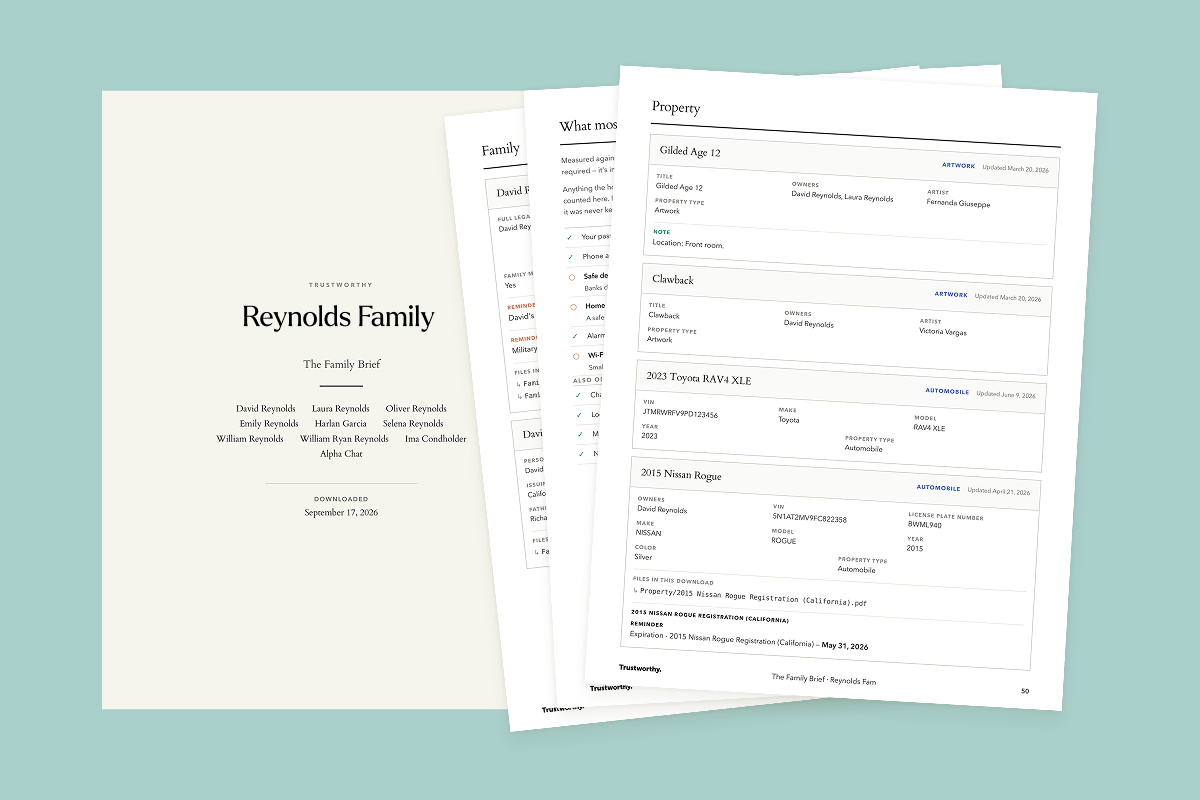
The Family Brief is a printable summary of everything your household keeps in Trustworthy. It comes in the same download as your files whenever you export your data.
The Brief is written for someone who has never used Trustworthy: a spouse, an adult child, or anyone who may one day need to step in for you. It has to make sense on paper, without the app and without anyone to ask.
How to get yours
On the web, go to Settings and choose Export data, then start an export. We build your Family Brief and gather your files. It can take a few minutes, and you are welcome to close the window while we work.
We will email you when it is ready, and your download link stays available for 24 hours. For the steps with screenshots, see How to Export Your Data from Trustworthy.
What's Inside The Family Brief
The Family Brief walks through every category in your account, one section at a time, and prints each page's information: what it is, the details you have saved, any notes and reminders on it, and the name of every file attached to it.
Your files arrive sorted into folders that match, so you can go from a page in the summary to the original document. Contacts get a directory of their own: everyone you have saved, and how to reach them.
Every record shows when it was last updated, and the cover carries the date you downloaded it, so anyone reading it knows how current it is. You can print a fresh copy whenever you like. Each export builds a new one from your account as it stands that day.
A checklist for every category
Each section opens with a checklist of what most households keep there, measured against what you already have. Nothing on it is required. Think of it as inspiration instead of a blank page.
Who can see or edit your account
The first section following the table of contents lists everyone who can reach your account: their name, how you have described them, their email address, what their access covers (full, partial, or legacy), and whether they can make changes.
It also shows invitations that have not been accepted yet. A legacy access invitation that was never accepted means that person cannot reach the account after a death. The arrangement exists on paper only, and seeing it printed is often the first time anyone notices.
Access is changed in Trustworthy under Manage access.
Scan to open the live account
The cover and every section divider carry a QR code. Scan the cover to open the account, or scan a section to go straight to that part of it. A printed copy is a snapshot of one day; the code takes you to the current version, where the information is up to date and the files can be downloaded. What you can see or change there depends on your own access.
On a screen, the Brief is clickable as well as scannable: every row in the table of contents jumps straight to its section, and each code opens the account without reaching for your phone.
Pages you started but never finished
A page you created and never filled in is still listed by name. That matters more than it sounds: to someone stepping in for you, an empty page called My 401(k) may be the clue that tells them the account exists at all.
Files you never filed
Files that arrived but were never filed are kept together under Still in the Inbox. Anything you have archived is listed at the back, so a document you put away is still accounted for.
Handle it with care
Nothing in The Family Brief is redacted, and the document says so on its own first page: your numbers and passwords are printed so that it can stand in for the account.
Once it is downloaded it is not encrypted. Keep it where you would keep the paper originals, and share it only with people you trust. Anyone with full access to your account can download it, and it contains every record in the account.
The Family Brief is a summary resource. It isn't legal, tax, financial, or insurance advice, and it doesn't replace professional guidance, or the original documents themselves.