
The Resilience Score: See How Prepared Your Family Is
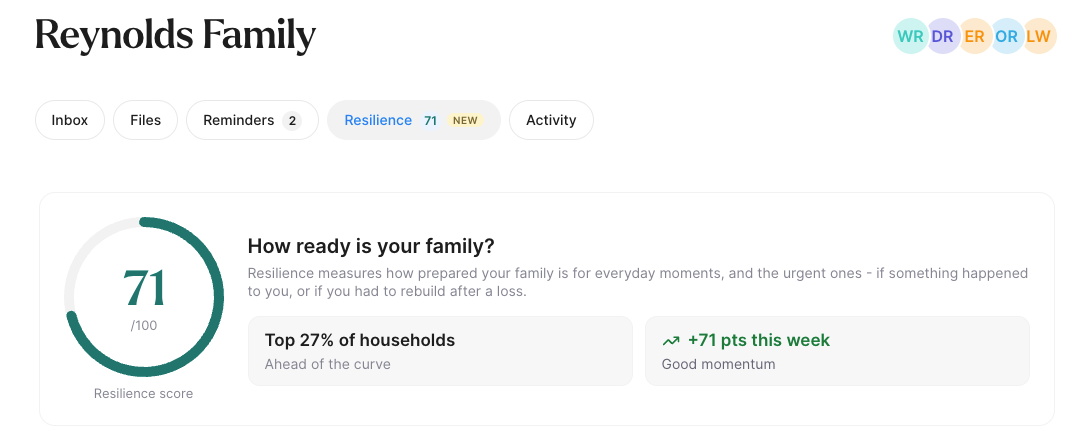
The new Resilience Score helps you see how prepared your family is for everyday needs and unexpected events, like an emergency or having to rebuild after a loss. It gives your household a score from 0 to 100 and recommends the most useful steps to take next.
You'll find your score on your Home dashboard, next to Inbox and Reminders. The feature is marked BETA while we continue to refine it.
How Your Score Works
Your score reflects how well you've prepared your family by saving important documents and details in Trustworthy, where the people who rely on that information can find and use it when needed.
It looks across eight areas:
Estate & Legacy: A will, power of attorney, advance healthcare directive, and, where applicable, a trust.
Insurance & Protection: Life, health, homeowners or renters, and vehicle insurance, where applicable.
Identity & Records: A government-issued ID, Social Security card, and birth certificate for each family member.
Access & Continuity: A legacy access contact and a collaborator who can access your Trustworthy account.
Income & Finance: A bank account, retirement account, latest federal tax return, and business formation documents, if applicable.
Property & Home: A deed, closing disclosure, or lease, plus vehicle registration if you own a vehicle.
Renewals & Deadlines: Reminders for documents with upcoming expiration or renewal dates.
Bills & Everyday: A utility bill and, for veterans, VA benefits documents.
Only items relevant to your family affect your score. For example, if you don't have a vehicle, you won't lose points for missing vehicle insurance or registration.
The score ring changes color as you progress: orange while you're building, green when you're well covered, and teal when your family is strongly prepared.
Improving Your Score
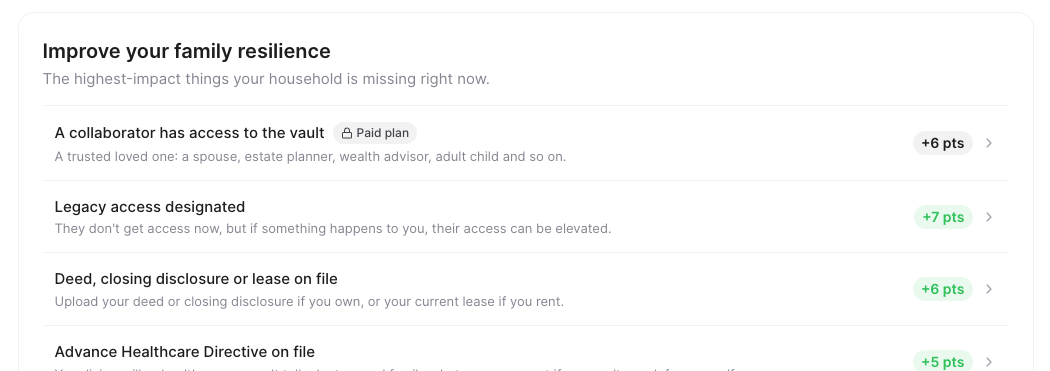
The Improve your family resilience list recommends the most important steps to take next. Each suggestion shows how many points you can gain, such as +5 pts. Click a suggestion to get started:
Documents and accounts: Open the Add window to upload a file.
Legacy access and collaborators: Go to Manage Access to share information with someone you trust. See Collaboration: Adding Household Members & Trusted Contacts.
Renewal reminders: Open the document's Reminders section to set a reminder. See Reminders.
Suggestions marked Paid plan, such as adding a collaborator, require a paid membership. Click one, or See plans under What else comes with a plan, to explore your options. See Understanding Trustworthy Subscription Plans.
As you complete suggestions, they move to suggestions complete at the bottom of the list. Expand it to see what you've accomplished.
When Your Score Updates
Your score updates automatically within seconds as you make progress, including the number displayed on your Home dashboard.
Most documents improve your score as soon as they've finished processing, even before you file them from your Inbox. These include wills, powers of attorney, IDs, insurance policies, statements, deeds, leases, tax returns, and utility bills.
Adding family members helps you prepare for everyone in your household. As you add family members to Trustworthy, your recommendations expand to include important records for each person, such as birth certificates. This helps you see what's needed to make sure everyone is covered. See Introducing the Trustworthy Inbox.
Deleting an important document can lower your score. If you remove a file that contributed to your preparedness, the related suggestion returns to your improvement list until you add a replacement.
If you upload files while viewing your Resilience Score, a banner shows how many are still processing and how many are ready to review in your Inbox.
Help Us Get This Right
Every family is different. A few quick questions help Trustworthy tailor your score and recommendations to your circumstances.
For example, do you own or rent your home? Have a vehicle or business? Are you a veteran? What are your family members' dates of birth?
Each question shows how many recommendations your answer will help clarify. Answering No removes items that don't apply to you. And if Trustworthy already has the answer, such as from a vehicle record, we won't ask again.
Tracking Your Progress
Your Resilience Score also helps you see how far you've come and where you stand.
Recent progress: See the points you've gained today, this week, or over the past 30 days, with special recognition for significant progress.
Your progress: Follow how your score has changed over time.
Compared to other households: See how your score compares with other Trustworthy households using anonymized data. You might see Top 30% of households, for example. If you're below the halfway mark, you'll see how many points could move you into the top half, often with a suggested next step.
Score notifications: When your score changes, a notification lets you view the update. If your score drops, you'll see why, such as a document no longer contributing to your preparedness or a change to your plan.
See what changed: If your score has dropped over the past 30 days, click See what changed to review which items stopped contributing to your score and how to restore them.
Tip for Using Your Resilience Score
Start at the top of your recommendations. Suggestions are ordered by impact, so the first few steps can often make the biggest difference in your family's preparedness.